Tech experiment · ChacharApp on iOS
Running AI models on your phone is possible
Whisper turbo transcribing locally, on an iPhone, with the audio never leaving the device. It can be done... But it comes at a cost.
I've tried the model on the phone and it works. Whether it works the way you want is another story.
First, some context. I already built this for the Mac: ChacharApp, a dictation tool where you hold a key, speak, and the text shows up. I took the inspiration from Wispr Flow, with one condition: everything local, without paying and without exposing my data. The mic button already exists, sure — but anyone who has tried it knows it gets words wrong, doesn't know your project's vocabulary, and if you say "the car is red… no, no, green", it transcribes all of it, when all you wanted to say was "the car is green". The tool exists precisely to fix both that problem and adding words to your project's jargon.
So the idea was to bring it to the phone. On paper it adds up: the model weighs about 620 MB and an iPhone has 6 GB of RAM. And an example use case: you're driving, you want to answer a WhatsApp message, and all you want is to dictate.
Loading the 626 MB model took on the order of minutes. Imagine you're about to send a message and you have to wait minutes before you can even start. Well, at least it only happens the first time it loads, because iOS has the ability to cache it… although that adds extra friction: every time the phone powers off, or the app gets updated, the model has to load all over again. We're hurting something fundamental… availability.
Not to mention the battery drain: you pick up the phone and start noticing it's burning hot and the battery is draining drastically. Because you think the MacBook has an incredible battery and you feel no friction while you're working, when the machine is plugged in. But the phone, the phone was built to live unplugged: the cost of keeping this model on is sky high…
And then the last problem. iOS has no such thing as daemons, those background processes that live forever, unless someone deliberately suspends them… especially if they take up a big chunk of RAM. When you open Lightroom you can take up, spend a lot of RAM. But if you leave that app and go to Instagram, Lightroom has no right to spend that many resources. And that's fair, it's good design, but that design drastically hurts a dictation tool that must always be available. It's actually what Wispr Flow does on iOS: it opens its own app for a second and you rush back to WhatsApp, just to re-warm the model. A trick, not a solution.
In short: if you ever wonder why the iPhone's dictation isn't that good, it's because it can't spend that many resources. Quality dictation would mean degrading everything else the phone does. In this case the trade-off is the cloud, which isn't free either: you pay, you depend on connectivity, and you expose your data.
The trade-offs #s1
The three problems above, put into one image:
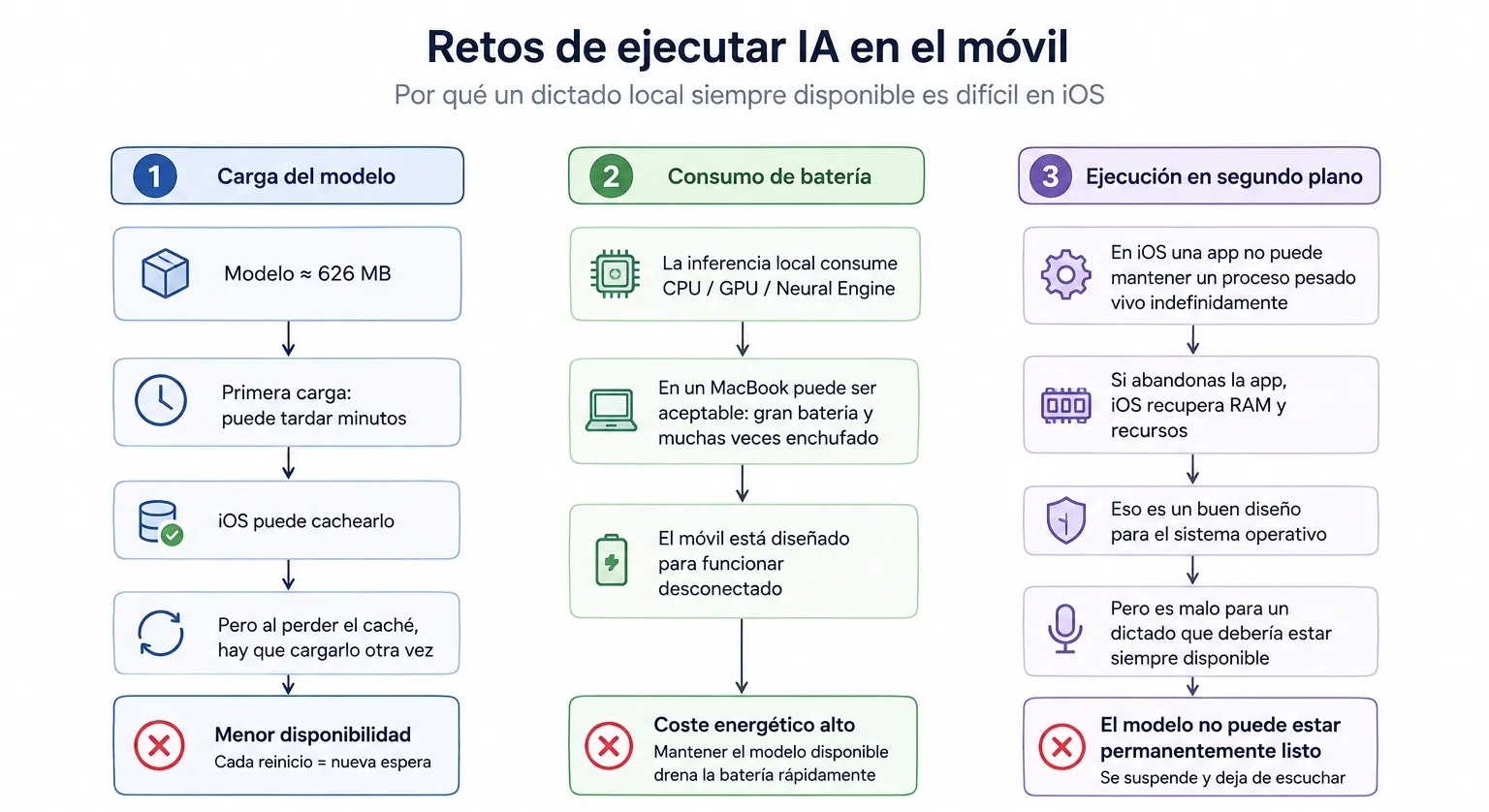
- Model loading: 626 MB you pay in minutes the first time, and again every time the cache is lost. Every reboot, a new wait.
- Battery: local inference leans on CPU, GPU and the Neural Engine. On a MacBook you can afford it; on a phone that lives unplugged, you can't.
- Background: a third-party app can't keep a heavy process alive forever. iOS takes the RAM back the moment you leave, and the model stops being ready.
The technical explanation #s2
The above is the short version. The data behind it, point by point:
- Initial load: measured, with one caveat. The first load of turbo (626 MB) took minutes, peaking above 3.2 GB of memory with jetsam risk; "warm" loads were still tens of seconds. One detail matters: part of that cost was a development artifact, because every rebuild invalidates the ANE compilation cache, so we paid the recompilation over and over. In production, a user would pay it once per app update. But even discounting that, tens of seconds of warm load already break the feeling of instant dictation.
- Battery: consumption does go up. Leaning on the ANE for inference and keeping the mic hot (orange dot on) all session shows: the phone gets burning hot and the battery drains drastically. What we don't have yet is an exact figure for how much; the proper measurement is still pending.
- Keeping the model resident: the root cause. iOS has no background daemons, every process has a jetsam ceiling (which is why an M1 with 8 GB ran great while a 14 Pro Max with 6 GB didn't: the Mac has swap, compressed memory and no per-process cap), and audio capture can only start in the foreground. The telling part: the resident footprint was only about 90 MB (mapped weights). The problem was never keeping the model in memory — it's that iOS won't let a third-party app own an always-ready model. The only resident model on iOS is the system's own (Speech): that's why Apple's dictation is instant and ours couldn't be. And we ruled that one out on quality grounds, rightly so.
- The usage is different. On the Mac, Chachar is an always-alive menu bar process; on the iPhone it's an app iOS puts to sleep the moment you look away. Wispr Flow chose the app format, which is exactly what Chachar doesn't want to be.